Gridfinity tool insert from a photo
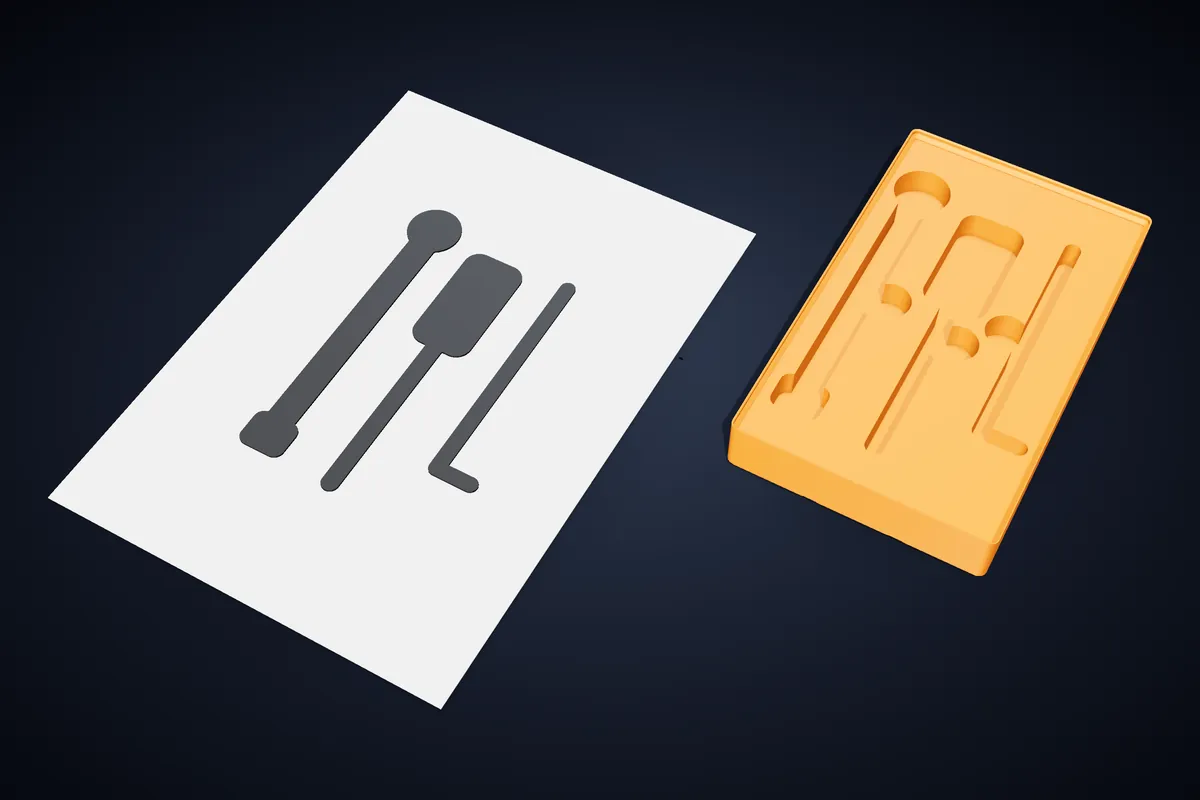
Lay your tools on a sheet of paper, take one photo, and get a Gridfinity bin with a pocket shaped to each tool. The sheet is the ruler, so there is nothing to measure or calibrate.
Just one project? A 7-day Pro pass is €4.99, no subscription.
How it works
- 1
Lay the tools on a white sheet
An A4 or US Letter sheet on a darker table, the tools at least 1 cm from its edges and not touching each other. Even daylight works better than a lamp straight above, which casts hard shadows.
- 2
Take the photo from above
Hold the phone roughly level over the sheet with all four corners in the picture. The studio finds the corners, straightens the sheet and works out the scale from its size.
- 3
Check the outlines
Each tool is shown on the straightened sheet with the pocket drawn round it. Change the clearance or the sensitivity and the outlines are traced again from the same photo.
- 4
Set the depth and download
Choose how deep the pockets go and whether each one gets a finger notch. The bin grows in whole cells and height units to fit, and the print check runs before you download.
What the insert is
A solid Gridfinity bin on the standard feet, with the top cut into one pocket per tool, like the foam in a tool case but printed and on the grid. It drops into any baseplate that follows the 42 mm standard.
Tools that lie closer together than the clearance share one pocket, and gaps too thin to print between two pockets are closed, so every wall that is left can be printed.
- Paper
- A4 (210 × 297 mm) or US Letter (8.5 × 11 in), portrait or landscape.
- Clearance
- 0 to 4 mm round every tool, 1 mm to start with.
- Depth
- 3 to 80 mm; the bin gets taller in 7 mm units to hold it.
- Finger notches
- A 20 mm round notch beside each pocket, placed where it does not hit a neighbour.
- Size
- From 1 × 1 up to 6 × 6 cells; the layout is turned a quarter if that needs fewer cells.
- Base
- Stacking lip on or off, and 6.5 mm magnet pockets or 3 mm screw holes underneath.
Getting a clean trace
The trace looks for anything darker than the paper or a different colour from it. Dark handles and painted tools come out best; bright chrome can reflect the paper, so turn shiny tools until they look grey in the photo.
Soft shadows are ignored, but a hard shadow from a single lamp can be read as part of the tool. Turn the sensitivity down if outlines come out fat on one side, or up if a pale part of a tool is missing.
The photo is read in your browser and is not uploaded; only the finished outlines are kept with the design.
Printing the insert
Print it upright like any bin, with no supports: the pocket walls are vertical and the floors are flat. A 0.2 mm layer height, three or four perimeters and 15–20% infill suits almost everything here, and none of it needs supports when printed flat on the bed.
A long tool needs a long bin: a 6 × 1 insert is 252 mm long and needs a 256 mm bed. On a smaller printer, give long tools a bin of their own and let the print check confirm the fit before you slice.
Questions
Do I need a reference object or a ruler in the photo?
No. The sheet of paper is the reference: its four corners give the scale and undo the perspective. Choose A4 or Letter to match the sheet you used.
How accurate is it?
Within about a millimetre on a photo taken from above with the whole sheet in view. That is what the default 1 mm clearance is for; raise it for tools that should drop in loosely.
Can I put several tools in one bin?
Yes, as many as fit on the sheet. They keep the places you laid them in, and the bin is sized round the group.
What if a tool is longer than the sheet?
Anything cut off by the edge of the sheet is cut off in the pocket too, and the studio warns you when a tool reaches the edge. Trace long tools on their own, diagonally if needed.
Can I try it before paying?
Yes. You can trace your photo and inspect the insert in 3D. Downloading needs the Pro plan, or a 7-day pass if you only have one drawer to sort out.
Related
Try it now
Pro includes this mode. Cookie cutters stay free.
Just one project? A 7-day Pro pass is €4.99, no subscription.